Add CreditRiskMonitor single sign-on support to your Azure/Entra tenant
Follow these instructions to add CreditRiskMonitor OpenID Connect (OIDC) based single sign-on (SSO) to your Microsoft Entra (formerly Azure Active Directory) tenant.
It is recommended that you use a non-production environment to test the steps in this page.
Prerequisites
To configure OIDC-based SSO for your organization, you need:
A Microsoft Entra user account with one of the following roles: Global Administrator, Cloud Application Administrator, Application Administrator, or owner of the service principal.
Add the application
To add an enterprise application that uses the OIDC standard for SSO, you must find the application in the Entra ID Gallery (formerly the Azure App Gallery), select the application, and complete the sign-up process.
To configure OIDC-based SSO for an application:
Sign in to the Microsoft Entra admin center as at least a Cloud Application Administrator.
Browse to Identity > Applications > Enterprise applications > All applications.
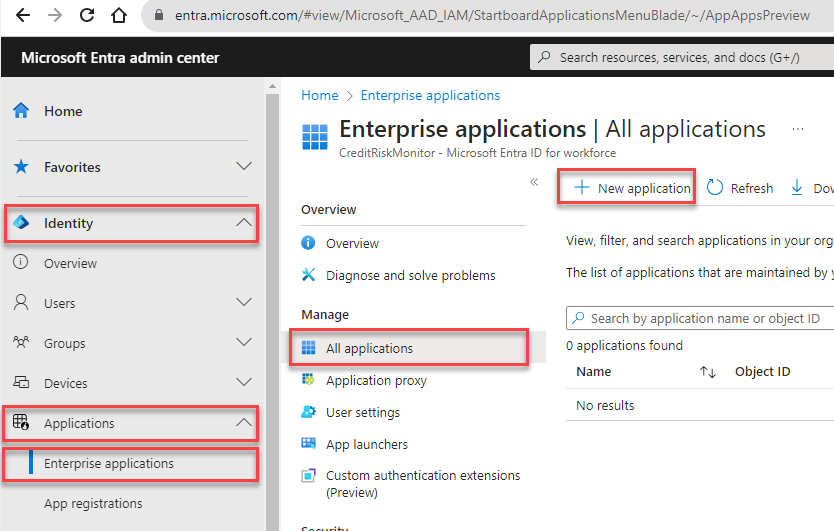 In the All applications pane, select New application.
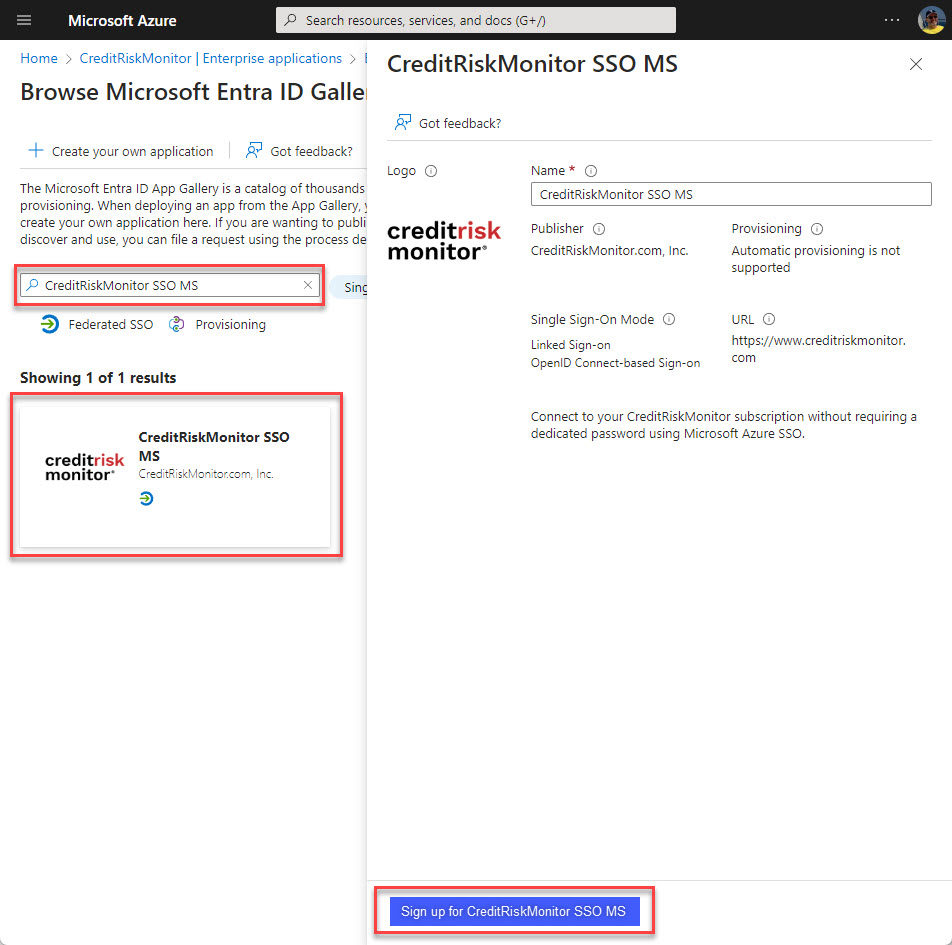
The Browse Microsoft Entra ID Gallery pane opens and displays tiles for supported single sign-on (SSO) applications.
Search for CreditRiskMonitor SSO MS and select that tile.
Select Sign up for CreditRiskMonitor SSO MS button on the bottom of the right pane.
As an administrator for your Entra tenant, you will be asked to Consent on behalf of your organization. To learn more about user and admin consent, see Understand user and admin consent.
Select Accept. The application is added to your tenant.
If you already have a CreditRiskMonitor license, your user details and tenant information are validated and you will be logged in to CreditRiskMonitor. If you do not have a license, the application will redirect you to the CreditRiskMonitor login page -- this is expected behavior.
Users from your tenant who do have access to CreditRiskMonitor can now access the site directly using sso.creditriskmonitor.com
|
|
Copyright © 2026 by CreditRiskMonitor.com (Ticker: CRMZ®).
All rights reserved.
Reproduction not allowed without express permission by CreditRiskMonitor.
The information published above has been obtained from sources CreditRiskMonitor considers to be reliable.
CreditRiskMonitor and its third-party suppliers do not guarantee the accuracy and completeness of the information and specifically do not assume responsibility for not reporting any information omitted or withheld.
The FRISK® scores, agency ratings, credit limit recommendations and other scores, analysis and commentary are opinions of CreditRiskMonitor and/or its suppliers, not statements of fact, and should be one of several factors in making credit decisions.
No warranties of results to be obtained, merchantability or fitness for a particular purpose are made concerning the CreditRiskMonitor Service.
By using this website, you accept the Terms of Use Agreement.
Contact Us: 845.230.3000
Fundamental financial data concerning public companies may be provided by LSEG Data & Analytics (click for restrictions)
Monday, April 6, 2026
|
|
|